
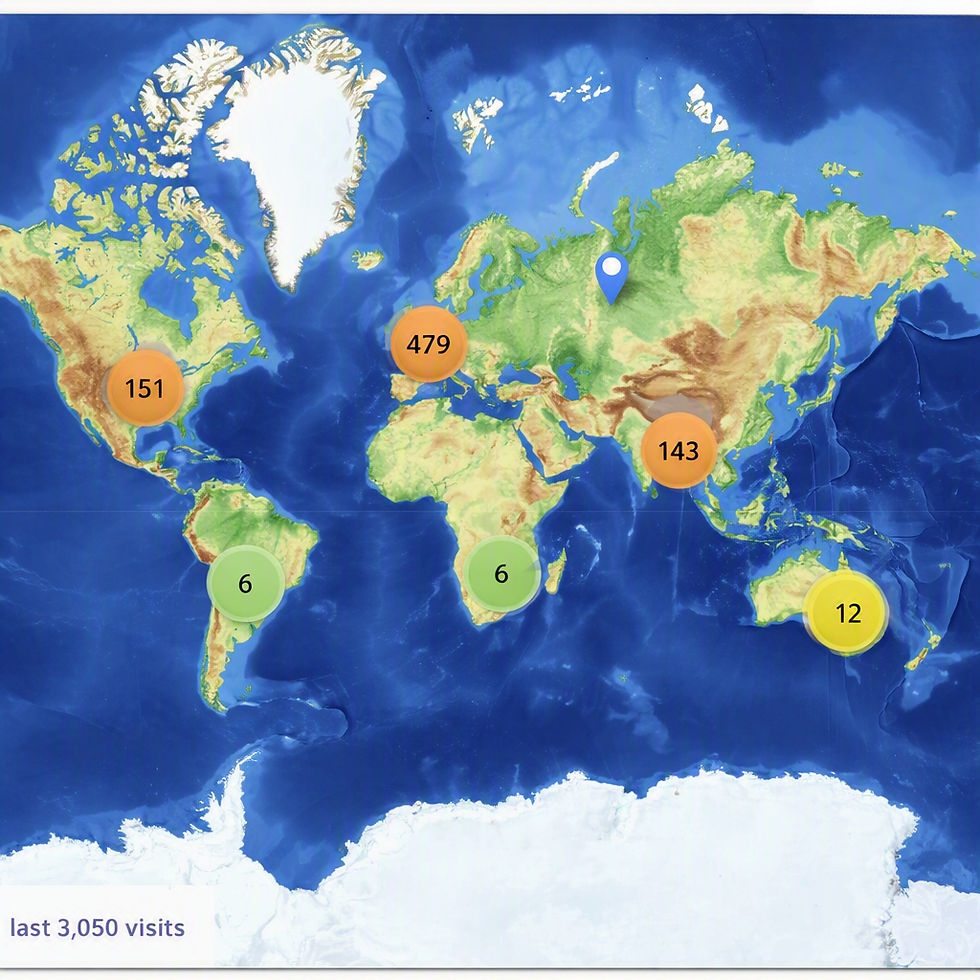
Modern Web Design Tips for Small Businesses, Checking in on all KHWD sites Visitors Maps and their Locations.

Creating a website that truly represents your small business is no longer optional. It’s essential. A modern, sleek, and user-friendly website can be your strongest asset in attracting customers and growing your brand. I’m here to share practical, energising tips that will help you build a website that stands out and works hard for your business.
KHWD sites Visitors Maps
The new Visitors Map buttons on the KHWD Websites page slideshow effortlessly delivering details of all the sites created by KHWD transforms how people explore the entire network of 18 KHWD sites. Instead of hunting through individual pages, visitors can now access every map from one simple, central location. It’s designed to be fast, intuitive and genuinely useful, giving users a clear visual overview of each site’s layout, key points of interest, routes, facilities and navigation options.
KHWD sites Visitors Maps , this new feature adds real value for anyone planning a visit, whether they’re discovering KHWD for the first time or returning to explore more locations. Each map is clean, easy to read and tailored to its specific site, helping visitors understand exactly what’s available and how to get around. It also strengthens your brand by showcasing the scale, organisation and accessibility of KHWD’s entire offering.
By bringing all 18 maps together under one button attached to the easy access slideshow means we have created a seamless, user‑friendly experience that encourages deeper engagement and makes sites feel more connected. Let us do that for your design and development It’s a smart upgrade that enhances usability, supports planning and highlights the breadth of KHWD’s destinations in a single, convenient hub.
Embrace Simplicity and Clarity in Design
When it comes to web design, less is often more. A clean, simple layout helps visitors find what they need quickly. Avoid clutter and focus on clear navigation. Use plenty of white space to give your content room to breathe. This makes your site feel open and inviting.
Here’s what you can do:
Use a limited colour palette that matches your brand.
Choose easy-to-read fonts and keep text sizes consistent.
Organise content into clear sections with bold headings.
Make buttons and links obvious and easy to click.
A simple design doesn’t mean boring. Use vibrant colours and bold images to add personality without overwhelming visitors. Remember, your goal is to make the user’s journey smooth and enjoyable.

Top Modern Web Design Tips to Boost Your Site
Let’s dive into some of the best modern web design tips that will give your small business website a fresh, professional look.
Mobile-First Design
More people browse on their phones than ever before. Your website must look and work perfectly on mobile devices. Start designing for mobile screens first, then scale up for desktops. This approach ensures your site is fast, responsive, and easy to navigate on any device.
Fast Loading Times
Speed matters. A slow website frustrates visitors and drives them away. Optimise images, use clean code, and choose reliable hosting to keep your site lightning fast. Tools like Google PageSpeed Insights can help you identify and fix speed issues.
Strong Visual Hierarchy
Guide visitors’ eyes to the most important parts of your site. Use size, colour, and placement to highlight key messages and calls to action. For example, your “Contact Us” button should stand out clearly on every page.
Consistent Branding
Your website should reflect your business identity. Use your logo, brand colours, and tone of voice consistently. This builds trust and makes your site memorable.
Clear Calls to Action (CTAs)
Tell visitors exactly what you want them to do next. Whether it’s “Get a Quote,” “Book Now,” or “Learn More,” your CTAs should be visible and compelling. Use action words and place CTAs strategically throughout your site.
Accessibility Matters
Make your website usable for everyone. Use alt text for images, ensure good colour contrast, and design with keyboard navigation in mind. Accessibility not only broadens your audience but also improves SEO.
By applying these tips, you create a website that’s not just beautiful but also effective in turning visitors into customers.

How much does a website designer cost for a small business?
Understanding the cost of hiring a website designer is crucial for budgeting your project. Prices vary widely depending on the designer’s experience, the complexity of your site, and the features you need.
Typical cost ranges:
Basic website: £500 - £1,500
A simple site with a few pages, basic design, and standard features.
Custom small business website: £1,500 - £5,000
Tailored design, more pages, custom graphics, and some advanced functionality.
E-commerce or complex sites: £5,000+
Online stores, booking systems, or sites with extensive custom features.
Keep in mind, ongoing costs like hosting, domain registration, and maintenance are additional. Some designers offer packages that include these services.
If you’re on a tight budget, consider starting with a simple site and upgrading over time. A professional designer can help you prioritise features that deliver the best return on investment.
Why Your Website Needs to Reflect Your Business Personality
Your website is often the first impression customers get of your business. It should tell your story and showcase what makes you unique. A generic or outdated site can make your business seem less trustworthy or professional.
Here’s how to inject personality into your site:
Use authentic images that reflect your local area or team.
Write in a friendly, approachable tone that matches your brand.
Highlight customer testimonials and success stories.
Showcase your products or services with clear, engaging descriptions.
By making your website a true reflection of your business, you build a connection with visitors that encourages them to choose you over competitors.
Practical Steps to Improve Your Website Today
You don’t need to overhaul your entire site overnight. Small, focused improvements can make a big difference.
Try these quick wins:
Update your homepage headline to clearly state what you offer.
Add or improve your contact information so it’s easy to find.
Check your site on a mobile device and fix any display issues.
Compress large images to speed up loading times.
Add clear calls to action on every page.
Use a consistent colour scheme that matches your branding.
Test your site’s navigation to ensure it’s intuitive.
These steps help you create a more professional and user-friendly website that attracts and retains customers.
Moving Forward with Confidence
Building a modern website for your small business is an exciting journey. With the right approach, you can create a site that looks fantastic, works smoothly, and drives real results. Remember to keep things simple, focus on your users, and let your business personality shine through.
If you want to explore more about web design for small businesses, there are plenty of resources and experts ready to help you take the next step.
Your website is your digital storefront - make it a place customers love to visit.


Comments